




As some of you know, I recently returned from CHA (the Craft & Hobby Association) trade show. I've described CHA to some of my non-crafty friends as the "Fashion Week" of the paper crafting world. It's a place where manufacturers get to debut their fresh & fabulous releases for the upcoming season. Store owners come prepared to place orders & others (like myself) attend as media... and then get to share our findings with the rest of the world. I have an album full of photos from the show HERE if you're interested in taking a peek.
I have a post on Paper Crafts Magazine's Moxie Fab World blog today filled with some of my favorite product finds and trends. But... there is SO much more to share than what can fit in a single blog post, so I'm sharing a little more here on my personal blog as well.
I love innovative products... and there were a few companies that just screamed brilliance! One of my favorite finds came from a new company called Clever Handmade. Heidi Grace Kress has been a fixture in the scrapbooking industry for years, working under labels such as Fiskars & Colorbok. Heidi debuted her new company at this show, where she has sole ownership & creative freedom.

One of my favorite products from Clever Handmade are these rub-on transfer embroidery patterns. They can be applied just like any other rub-on, but are intended to be used as a pattern to add hand stitching. The transfers are a light gray/silver color & once you add stitching, the lines are completely covered up.
I love the look of hand embroidery, and these patterns made it so easy!

The transfers come in SO many fun doodled designs! You can even embroider part of the design & leave the rest of the transfer in it's original state for a really cool design.
I applied one of Heidi's cupcake transfers to a shipping tag to create this project below:
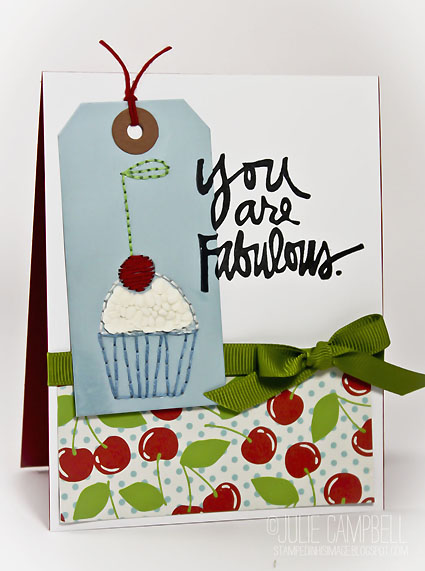
The sentiment on this card came from Technique Tuesday's Fabulous set by Ali Edwards. (I am the February guest designer for TT this month, so check back for more projects to come!) And... check out this patterned paper by GCD Studios that just so happens to perfectly coordinate! It's from their new Country Charm collection.
I have a post on Paper Crafts Magazine's Moxie Fab World blog today filled with some of my favorite product finds and trends. But... there is SO much more to share than what can fit in a single blog post, so I'm sharing a little more here on my personal blog as well.
I love innovative products... and there were a few companies that just screamed brilliance! One of my favorite finds came from a new company called Clever Handmade. Heidi Grace Kress has been a fixture in the scrapbooking industry for years, working under labels such as Fiskars & Colorbok. Heidi debuted her new company at this show, where she has sole ownership & creative freedom.

One of my favorite products from Clever Handmade are these rub-on transfer embroidery patterns. They can be applied just like any other rub-on, but are intended to be used as a pattern to add hand stitching. The transfers are a light gray/silver color & once you add stitching, the lines are completely covered up.
I love the look of hand embroidery, and these patterns made it so easy!

The transfers come in SO many fun doodled designs! You can even embroider part of the design & leave the rest of the transfer in it's original state for a really cool design.
I applied one of Heidi's cupcake transfers to a shipping tag to create this project below:
The sentiment on this card came from Technique Tuesday's Fabulous set by Ali Edwards. (I am the February guest designer for TT this month, so check back for more projects to come!) And... check out this patterned paper by GCD Studios that just so happens to perfectly coordinate! It's from their new Country Charm collection.

I added a bit of Liquid Applique to the center of my cupcake & heat-set it to make it look like frosting.
Another one of my squeals is the new Heidi Swapp collection. I could do an entire post on how innovative her products are! I highlighted one of my favorite products on the Moxie Fab World blog today, but literally her entire booth was packed with amazing things!


This package just makes my heart go all pitter-patter! Basically, you add a photo to a Polaroid-like folder and seal it shut. Then you can add rub-on words or other "social-media" stickers to the bottom of the Polaroid. They come in the colors above and neutral shades as well. I wish I had a picture of the finished project. They are just so much fun!
Heidi Swapp also has an innovative new way to scrapbook using a file-folder system. She debuted LOTS of resist products, perfect for inking/misting... and had some really fun products in trendy neon shades.
I've been seeing lots of cute bows/bow-ties popping up here & there & I think it could be the start of a new trendy shape.

Bow Ties by Heidi Swapp

Bow Paper Clips by Studio Calico
Anther HUGE trend this show was washi tape. It seemed like almost every manufacturer released their own design. Here's a peek at a few:

HUGE assortment of awesome washi from Love My Tapes!


Fun new designs from October Afternoon


AMAZING new designs from the Smash Collection!

Neon washi from Heidi Swapp

A great assortment from Bazzill Basics

Vintage designs from 7 Gypsies
As you can see... I could go on & on! I have so many more trends to share with you, but I'll have to save them for another day. I hope you've enjoyed a little inside scoop on this season's new designs. Make sure to check out the Moxie Fab World blog all week for more squeals and trend spotting from the other Go-to Gals!


